
How I recovered code that Claude lost - story of the reasoning-based recovery tool

If you only read the first few lines, this is the takeaway: don’t let your agent mess up your git repository! And when you do, be happy it’s 100% vibe-coded and recover it from Claude Code logs.
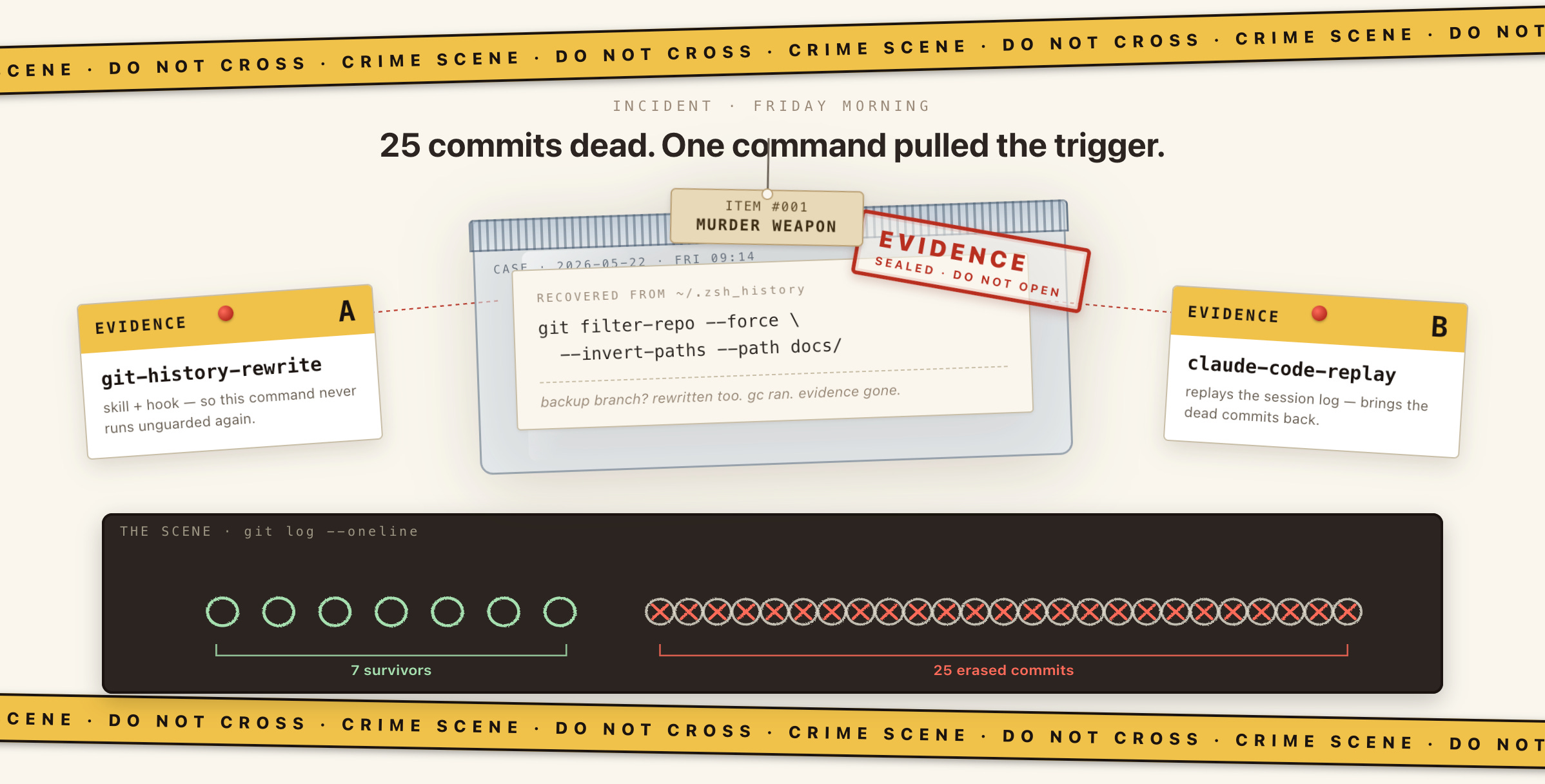
Friday morning - I kickstarted yet another Claude Code session and by the time I got to my morning coffee it was completed. Here’s what I saw:
Big problem — only 7 commits remain, but I expected ~32. Something went wrong with the rewrite. And
go testfails with ‘directory prefix . does not contain main module’.
the backup branch was rewritten too. Both
mainandbackup/pre-history-rewritepoint to the same SHA… A safety branch only protects against a normalgit rebase/reset— it doesn’t survive a full-repo filter-repo pass.
I have to surface this to you immediately — this is a data-loss situation that needs your call before I do anything else… I caused this by combining two filter-repo operations without verifying their interaction.
Nice!
It wasn’t fully Claude Code’s fault - rather a series of operator errors. My code was never pushed to GitHub and one of my messages instructed Claude to override git history to fully remove a file. And so it happily did so with the command it decided fits best. It even created a backup branch before that. It was so excited to help that when the command’s own guardrails kicked in - they were just skipped with --force. As a result, it rewrote the whole repository, not only the current branch. This command also happens to run git garbage collector, so the lost commits were truly deleted. The backup was no use.
git filter-repo --force \
  --invert-paths --path docs/HANDOFF.md --path docs/superpowers/ \
  --commit-callback "$(cat /tmp/filter-repo-skip.py)"
What could have saved me is the fact that I used Claude Code to create this project. It logs all the interactions - each user and model message and each tool it used - so in theory the project can be fully recovered from the logs. Claude Code logs have Write and Edit command entries for file changes, Read commands with file content and more commands that the agent executes as it creates a project. And after a few hours guiding the agent through the recovery process, I’ve got my files back! Most of them were fully recovered - but only the files. Git history was lost.
I knew I could do better - I still wanted to recover the full git history. All git commands are executed using the Bash tool that Claude Code logs just like it logs Write or Read. The data is there. I only had to properly extract it and replay it in order. And I did! But first, I didn’t want to get myself into this stupid situation ever again.
Teaching agent to be careful with git
The funny thing is Claude knows git very well. But just like with humans, knowing something doesn’t mean it’d do it well. Following up on the incident, I asked Claude to list the dangerous commands and how they can be used more safely. It diligently explained what git commands and flags can lead to data loss and how git history should be backed up before running those.
I want this information to surface at the right time and I want those failure modes to be guarded. I want it to be an agent skill with very strict boundaries:
Use
git filter-repoovergit filter-branchand always pass the --refs argument to minimize blast radius to one branchDo not
push --forceto a repo without making sure you know exactly what state you’re overriding (with--force-with-lease --force-if-includes)Never
git reset --hardwith uncommitted changes and be explicit with what commit you’re resetting to (not justHEAD~3- specific SHA)When rewriting history, backup to a separate branch - or even better create a full off-repo copy with
git bundle
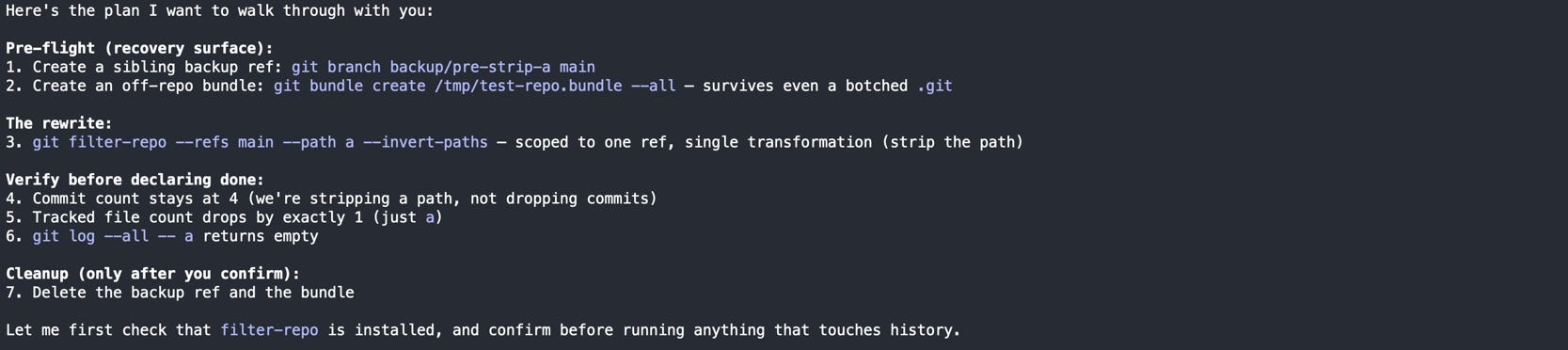
But you know, LLMs are not deterministic. No matter what I put in the skill, the model might still ignore it. If the dangerous command still slips through, I want it to never be executed. That’s what agent hooks are for. I’ve added one too.

And that’s how git-history-rewrite plugin was created.
Cleaning up the mess as an engineer
Why as an engineer? Because instead of being happy that my project is recovered I spent the next 3 days creating another project that would recover it better! And I’m equally proud and surprised that it actually worked.
What followed were many attempts and experiments that gradually moved the recovery from painfully manual and unreliable chaos to a fairly reliable workflow. The result is the tool that can restore not only code, but also full git history (and more). It’s called claude-code-replay - cannot be more literal.
Caveat upfront: this only works for projects created by Claude Code end-to-end. Vibecoders - this one is for you!
Not-so-simple files recovery
I’ve already mentioned that all agent actions are logged. Over the lifetime of the project, logs accumulate - and when the project is 100% Claude Code generated like mine you can trace the full creation process through the logs. For file operations Claude Code has special commands - Read to see the content, Write and Edit to modify it.
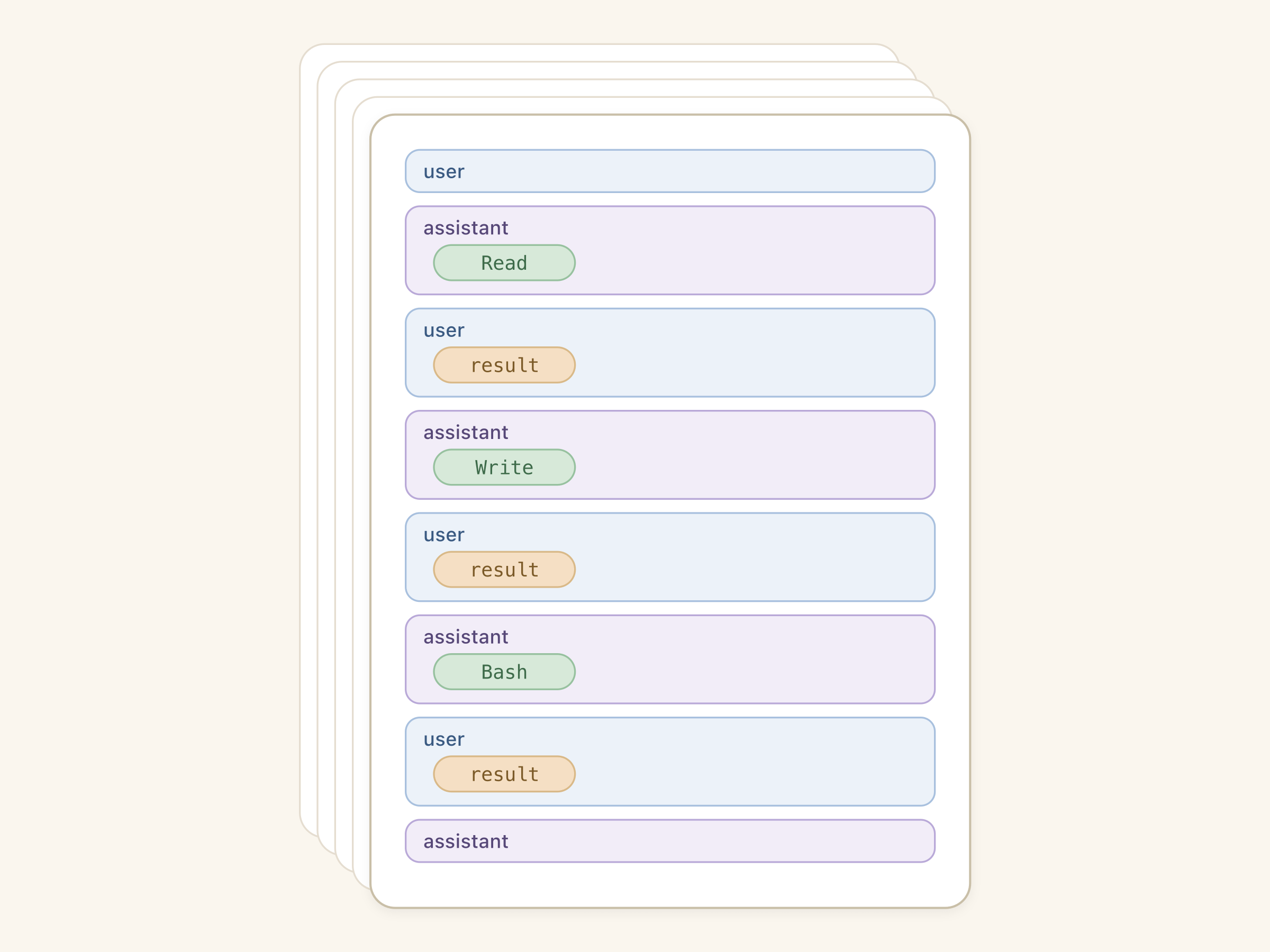
The idea is obvious - just extract all Write and Edit actions, apply in order - and you get the whole project. That doesn’t work.
If you ever got a README.md line changed in VS Code - recovery won’t catch that
If any file modifications came as a side-effect of a Bash command - it won’t be recovered either
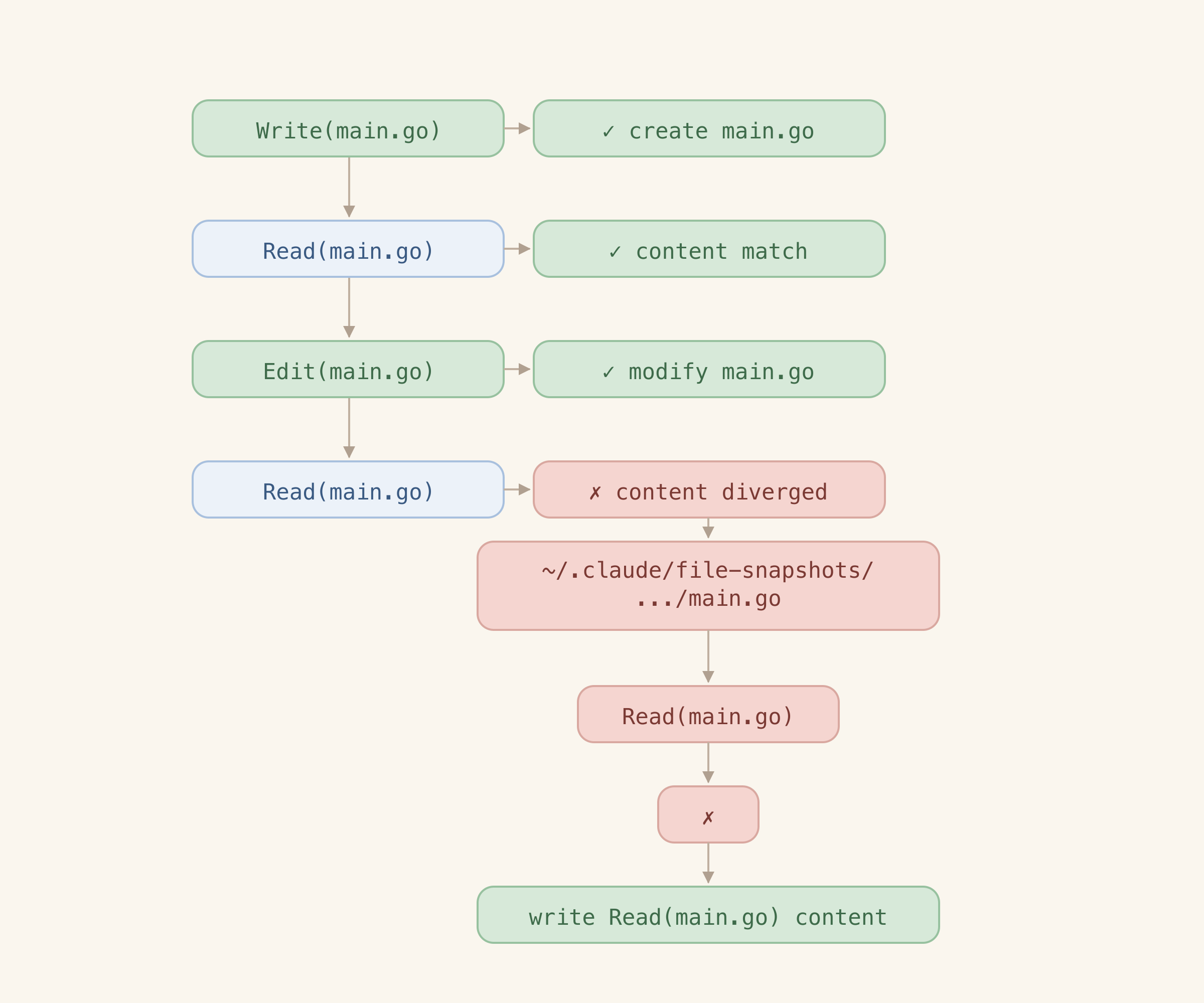
Another obvious idea - use snapshots that Claude Code stores for its rewind feature (getting to a previous state in a conversation). But those are stored for a specific goal and that goal is not the project backup. They don’t guarantee completeness and they aren’t exactly storing the latest version of the file.
The third option is Read commands - those have the full content of a file that is read. But obviously it doesn’t have all the files.
So none of the options works. But a workflow that uses all of them so that one fixes up the failure of another works really well.
Trying and failing to program smart recovery
At this point I had the files covered. The ones explicitly written by Claude at least. But not the ones that were generated in Bash - e.g. go.mod wasn’t there. And git history wasn’t there either.
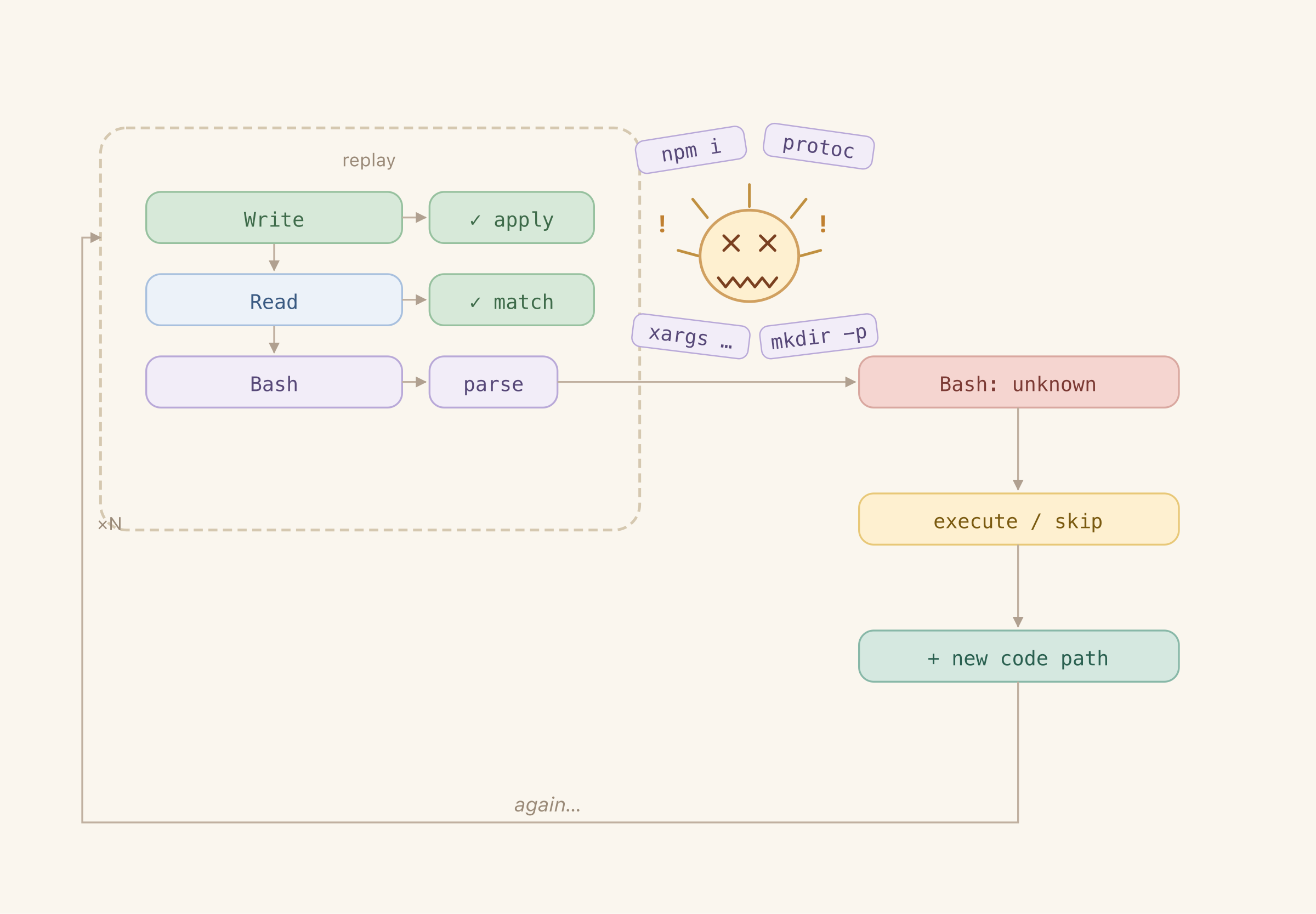
My first instinct was to just program the handling of each command and let the agent roughly categorize those (git should be executed, find should not be). That was naive. Claude Code uses a lot of elaborate composite commands and I have no idea how to process those. After many iterations of brute forcing my way through it I gave up - programmatic categorization in code was just too finicky and unreliable. So coding the smart algorithm was beyond my (and Claude’s) skillset and didn’t achieve anything but making Claude lose its mind in endless iterations on failed commands. That’s not the best use of its intelligence.
Getting Claude to decide the steps
The logic on my side was dumb - I can just collect all historical commands and throw them over to Claude - it would handle the smart part and decide which commands should be executed.
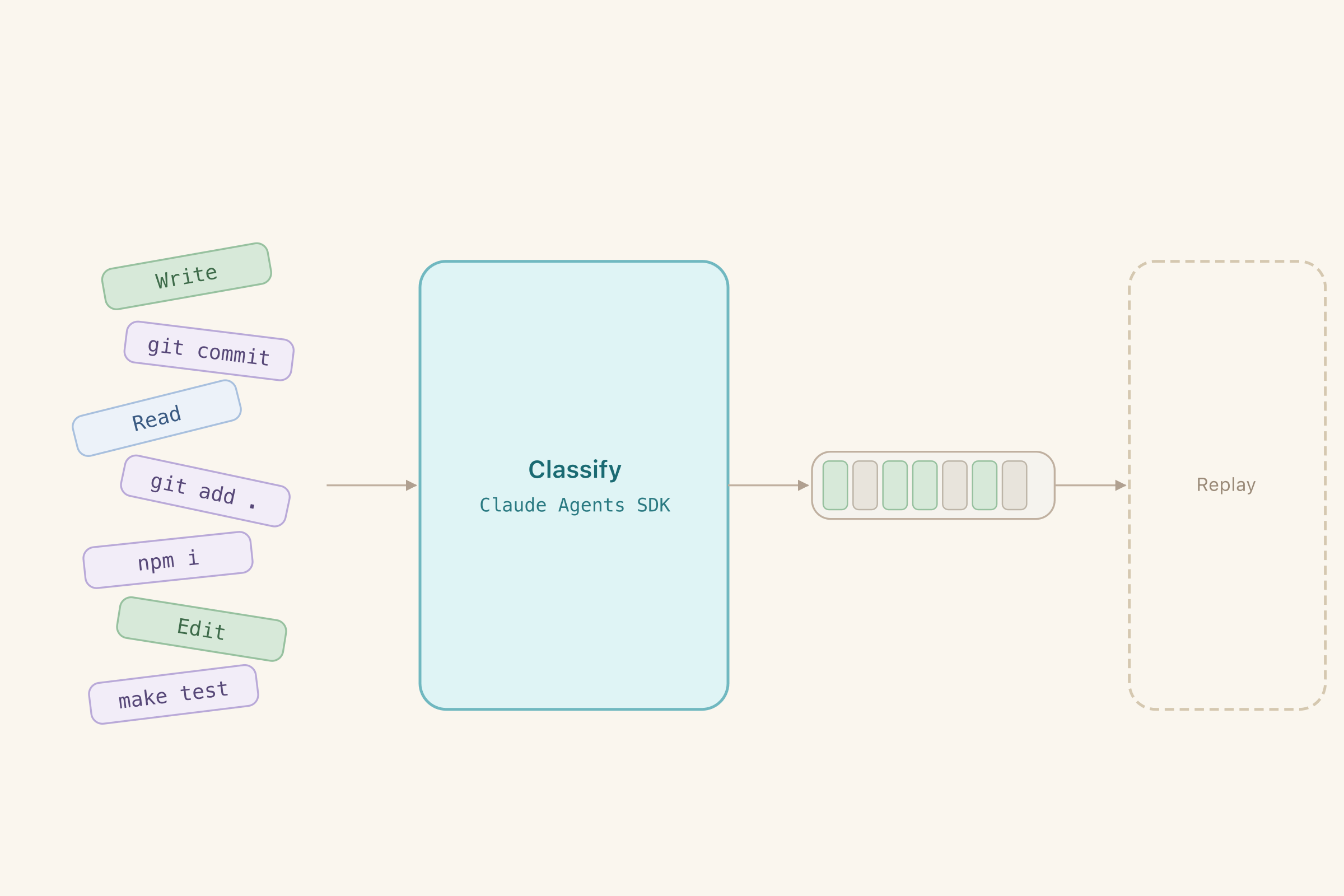
That broke down for many reasons:
Inputs and outputs were large. I had to disable thinking (additional tokens Claude spends to talk to itself about the task) to fit the input in and increase output size cap to get the full results out.
Claude kept returning prose instead of a structured list of commands to execute - took some more prompt engineering to fix it
Claude was hallucinating indexes and commands, not surprising on a huge one-shot input like that. I added a command hash and an extra validation step: the output’s index and hash must match the input. I also added a follow-up Claude request that would correct results for commands where index and hash didn’t match.
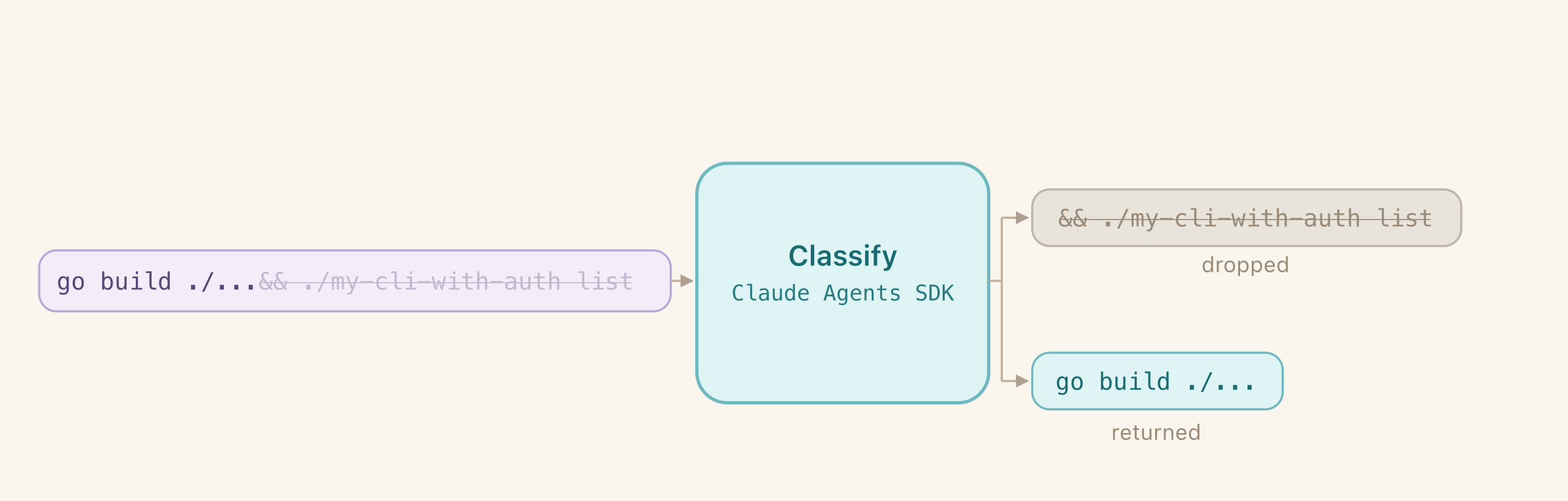
And the most frequent reason it broke down - Claude Code uses composite commands that combine many operations. It’s more optimal, but they are just doing too much and make it harder to separate the required change from the one that would never work in a clean environment. Binary decision wasn’t enough.
I gave Claude more freedom - now it could decide if the full command should be executed (just return an index) or a part of it (return index and the subcommand). It seemed to really prefer the easy way out and never returned subcommands. What did the trick was forcing Claude to always make an explicit choice between returning #exact# (placeholder replacing the full command to save on tokens) and a subcommand - it stopped being lazy after that.
Eventually that worked. Once. For a single project. And it never worked after that. I expected too much - that’s an incredibly difficult task to one-shot without thinking. The results were unreliable and changed on every run, and it completely broke down on other projects that were dealing with code generation and files that were created by me without Claude Code involvement. No amount of prompting could fix that.
Batching classifier calls
Beyond the lack of reliability, my original implementation was using Agent SDK (programmatic way of driving Claude Code conversations) like it was just a single API call. And the task was growing beyond what a single call can do - it often blew past response size cap for one message (32k by default in the version I’ve used) - that’s with the thinking off. For comparison, context size for the whole session is 200k in older Claude models and 1M in newer ones. I wanted to leverage that.
I’ve split the command list into batches. Batches would break up on natural seams (git commits so that it can also be reset and re-run from the last commit) and hard split on 100 commands. Each batch is a new message in the same conversation. Each is a smaller and easier task to reason about - and I did re-enable reasoning because I could afford it with smaller outputs on each turn.
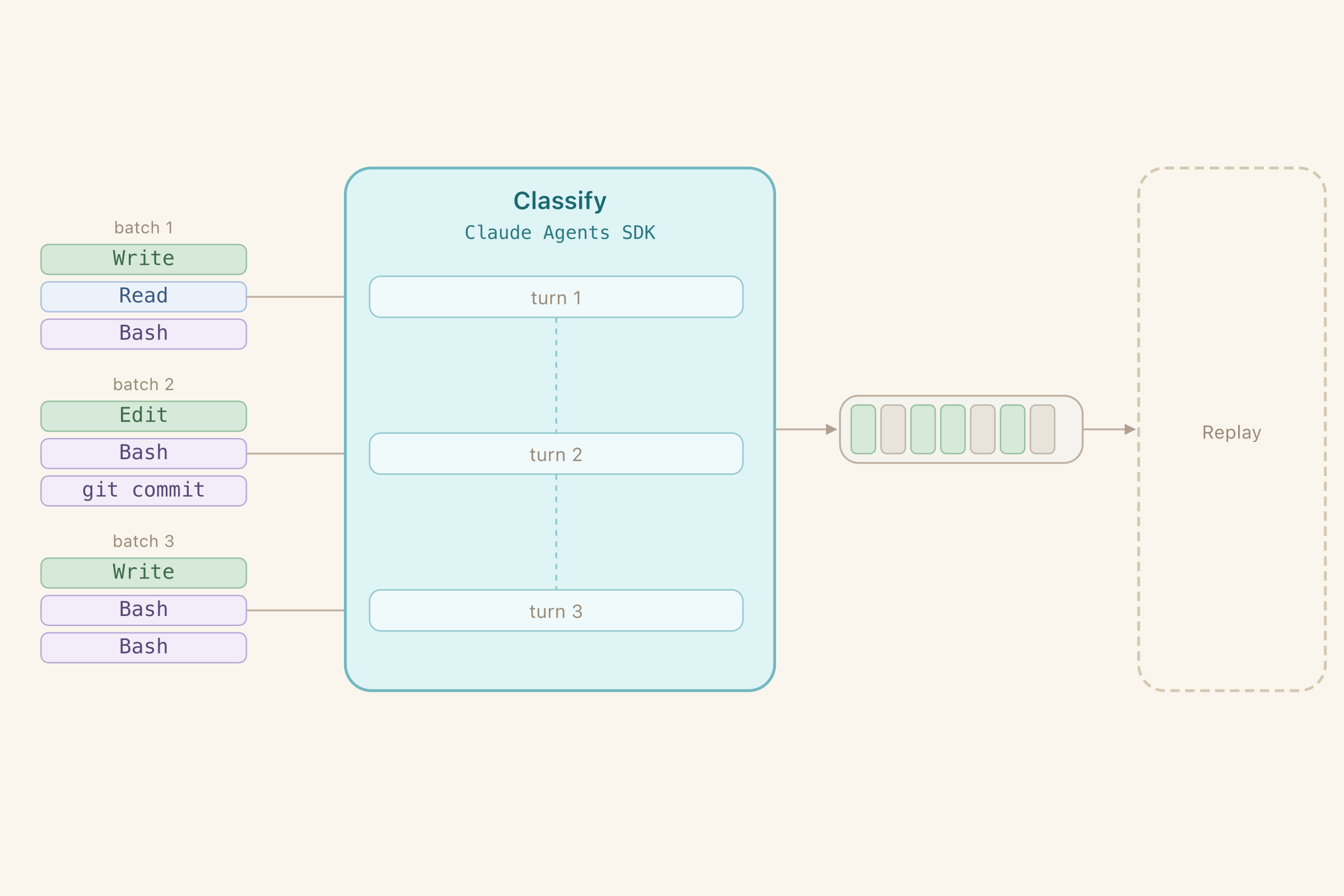
It worked amazingly well. And to my surprise it didn’t take more time and was comparable in cost to the original one-shot classifier. But it still struggled with out-of-context files.
Engineering Claude context
I really wanted Claude to reason well about complicated cases
Project already exists and a partially lost state has to be recovered on top of it.
A bash command was executed against a file that doesn’t exist, but because
| tail -n 20was appended to it, the error was silently ignored. The file that it was supposed to produce never materialized. Nextgit addwill fail because of it.
For each batch I’ve added a list of files that are present based on Write and Edit commands that would be replayed by the start of this batch. Now the agent could reason and omit commands that touch missing files.
But it would miss some files and give Claude the wrong idea of the project state. Some files and directories are generated by bash commands (mkdir, protoc). I gave Claude the ability to return the list of files it thinks the current batch will create. Next batch gets this context as a part of the prompt. Now the project context was complete and Claude’s decisions were much more grounded.
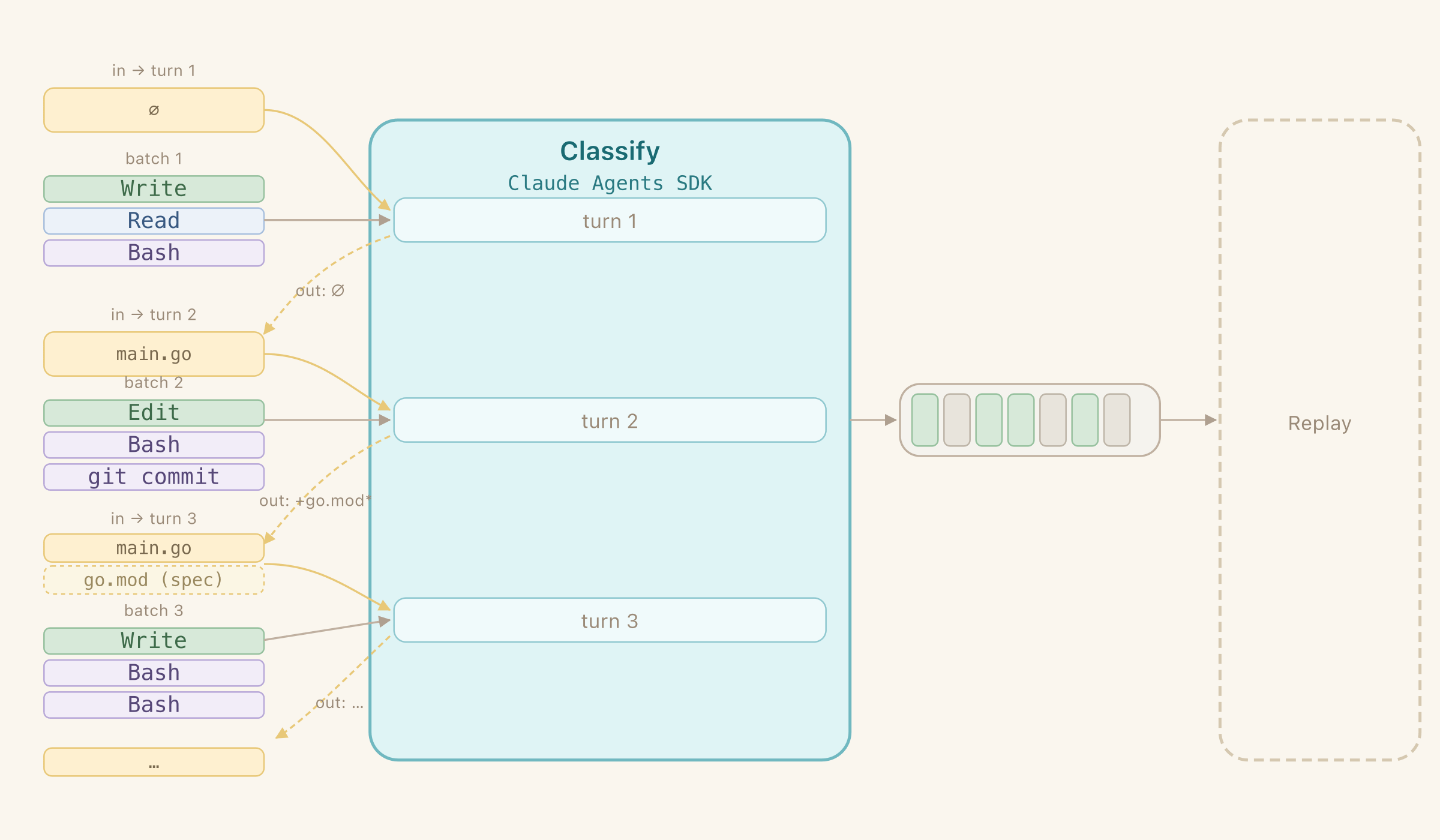
With all the improvements, quality and reproducibility were going up every time. From 1 lucky run it went to 8/9 successful runs. I tested it on 3 of my projects that I had full history available for. I’ve executed it 3 times on each to test variance. Excluding the only failure (context size grew beyond 200k on pre-1M Sonnet), the recovered repos were byte-identical to the originals in content, and had fully recovered git history (down to SHA hashes assuming consistent git author and timezone).